POD & PettyCash
🎯 Purpose
Proof of Delivery (POD): Uploading POD provides customers with a real-time update. Once uploaded, the system automatically sends an instant POD email notification to the customer.
Petty Cash: Recording trip-wise expenses ensures accurate reporting and makes expense management hassle-free.
🚚 Uploading POD
Follow these steps to upload a POD:
Go to Booking Management → POD & Claims tab.
Choose the relevant booking from the POD & Claims tab.
From the left-side menu, click POD & Claims to open the page.
Fill in the following fields: DO Number, Status and Remarks
Click the CHOOSE button to select the POD file.
Click Upload to save the file and Click SEND NOTIFICATION.
✅ The customer will instantly receive a POD email.

💰 Generating Petty Cash
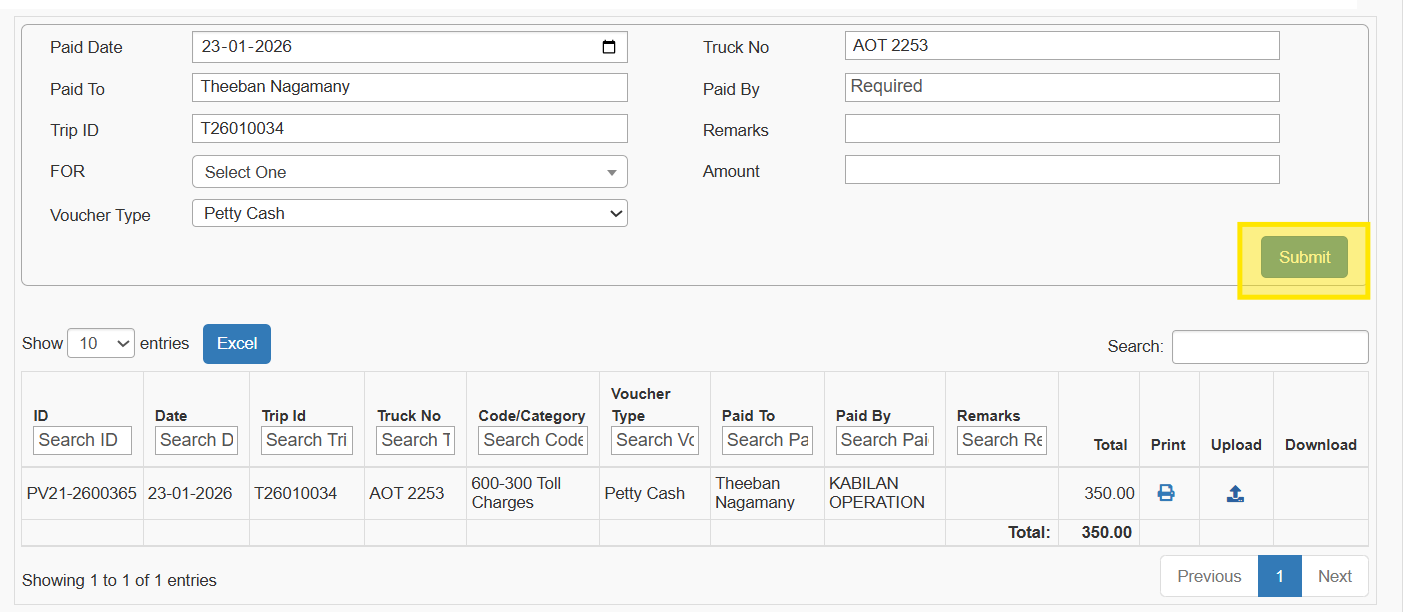
Click SHOW ADVANCED OPTIONS → The Claims form will open.
Fill in Trip & Attendant Allowance details and Click SUBMIT.

The following fields will populate automatically:
Paid To, Paid Date, Trip ID and Truck Number
From the FOR dropdown, choose the expense category (e.g., Toll, Diesel Charges).
Fill in: Paid By, Remarks and Amount
Click SUBMIT and ✅ The data is updated in the Petty Cash table.
📊 Key Benefits
Instant Customer Updates: POD emails are sent in real time.
Simplified Expense Tracking: Petty cash entries are organized trip-wise.