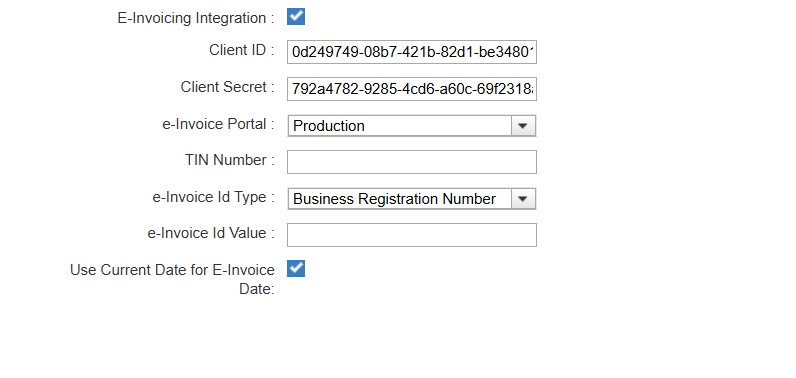
E-Invoice Integration
This guide explains how to integrate TCMS with the Malaysian LHDN e-Invoice Portal.
Steps
-
Navigate to Settings → Invoicing and enable E-Invoicing Integration.
-
Enter the Client ID, Client Secret, TIN Number, and select the e-Invoice ID Type & Value as registered with LHDN.
How to Obtain Client ID & Client Secret (MyInvois Portal)
- Log In – Sign in to the MyInvois Portal using your Malaysian TIN.
- View Profile – Open View Taxpayer Profile from the top-right profile menu.
- ERP Setup – Navigate to the ERP section (or Representatives) and click Register / Edit.
- ERP Details – Enter the ERP name, secret expiry period, and set it as the Primary System.
- Generate Credentials – Save the configuration to generate the Client ID and Client Secret.
-
Choose the e-Invoice Portal environment (Staging or Production).
-
Enable Use Current Date for E-Invoice Date to submit the e-invoice using the current date instead of the invoice date.
-
Click Save to complete the configuration.
Note: Once saved, you can enable the E-Invoice checkbox to submit invoices immediately during invoice, credit note, or debit note generation, or submit them later from the generated table.